One prompt, six landing pages — and a way to tell which one is working
We asked Claude for a landing page per audience — sales, fundraising, design, PR, recruiting, project managers — and had it publish all six as slim.to links with their own tracked calls to action. Here is the prompt, what came back, and how the comparison works.
The homepage has a row of cards called Who uses slim.to: sales, fundraising, design and product, PR and comms, recruiting. Five audiences, one paragraph each. Everyone who reads it is being sold the same page.
That's the usual compromise. Separate landing pages per audience are obviously better — a sales rep cares about open notifications, a designer cares about markup on the mockup, a PM cares about a link that updates in place — but six pages is six times the work, six deploys, and six things to keep in sync. So the cards stay cards.
Except we have an assistant connected to slim.to as a tool. So we asked for the pages.
The prompt
Write a landing page for each of the audiences on our homepage — sales, fundraising, design & product, PR & comms, recruiting — and add one for project managers. Lead each page with the features and flow that audience actually uses. Publish each one on slim.to at
/for-<audience>, and give every call to action its own tracked short link so we can compare them.
Then we went and made coffee.
What came back
Twelve links. Six hosted pages, each at the address we asked for, and six short links — one per call-to-action button — pointing at the sign-up page:
| Audience | Page | Its call to action |
|---|---|---|
| Sales | slim.to/for-sales | slim.to/join-sales |
| Fundraising | slim.to/for-fundraising | slim.to/join-fundraising |
| Design & product | slim.to/for-design | slim.to/join-design |
| PR & comms | slim.to/for-pr | slim.to/join-pr |
| Recruiting | slim.to/for-recruiting | slim.to/join-recruiting |
| Project managers | slim.to/for-project-managers | slim.to/join-project-managers |
They are real. The Who uses slim.to cards on the homepage now link to them.
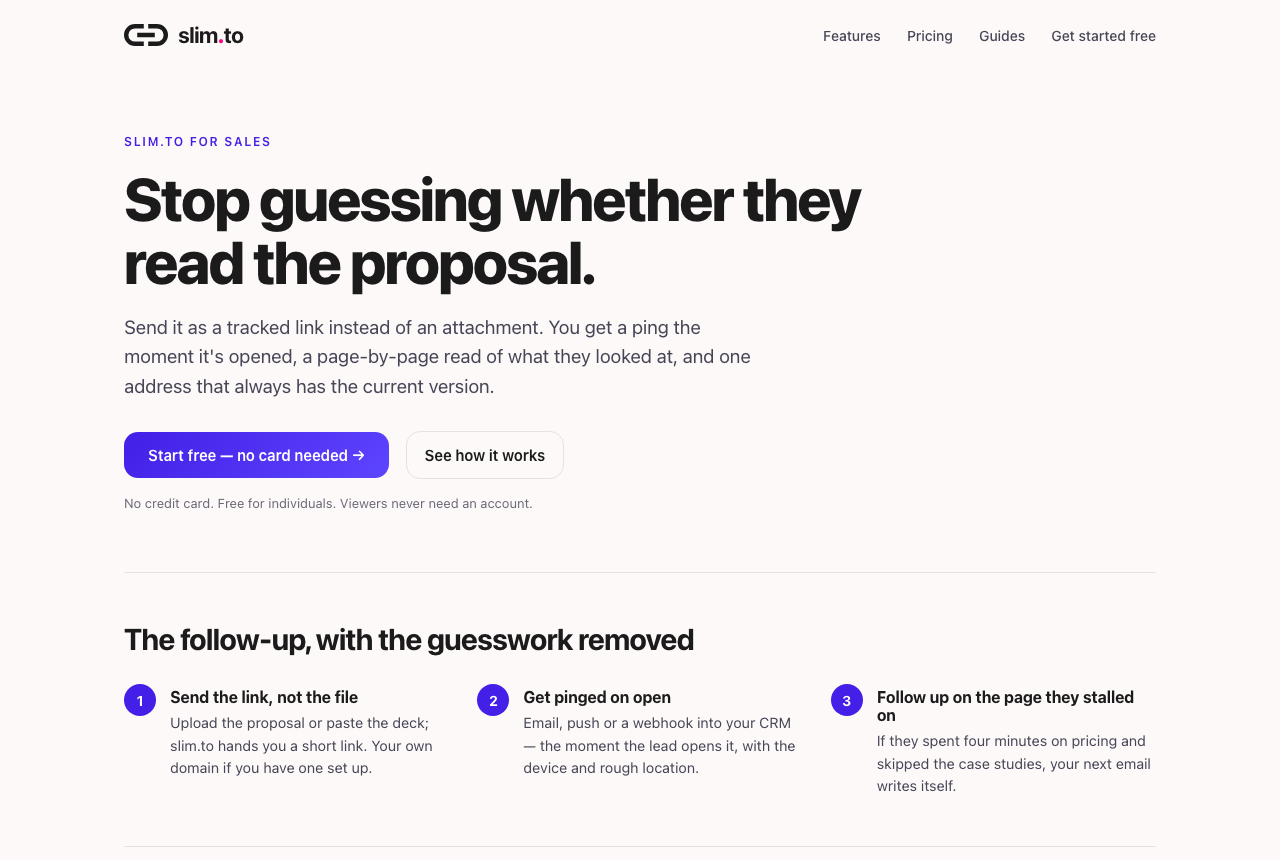
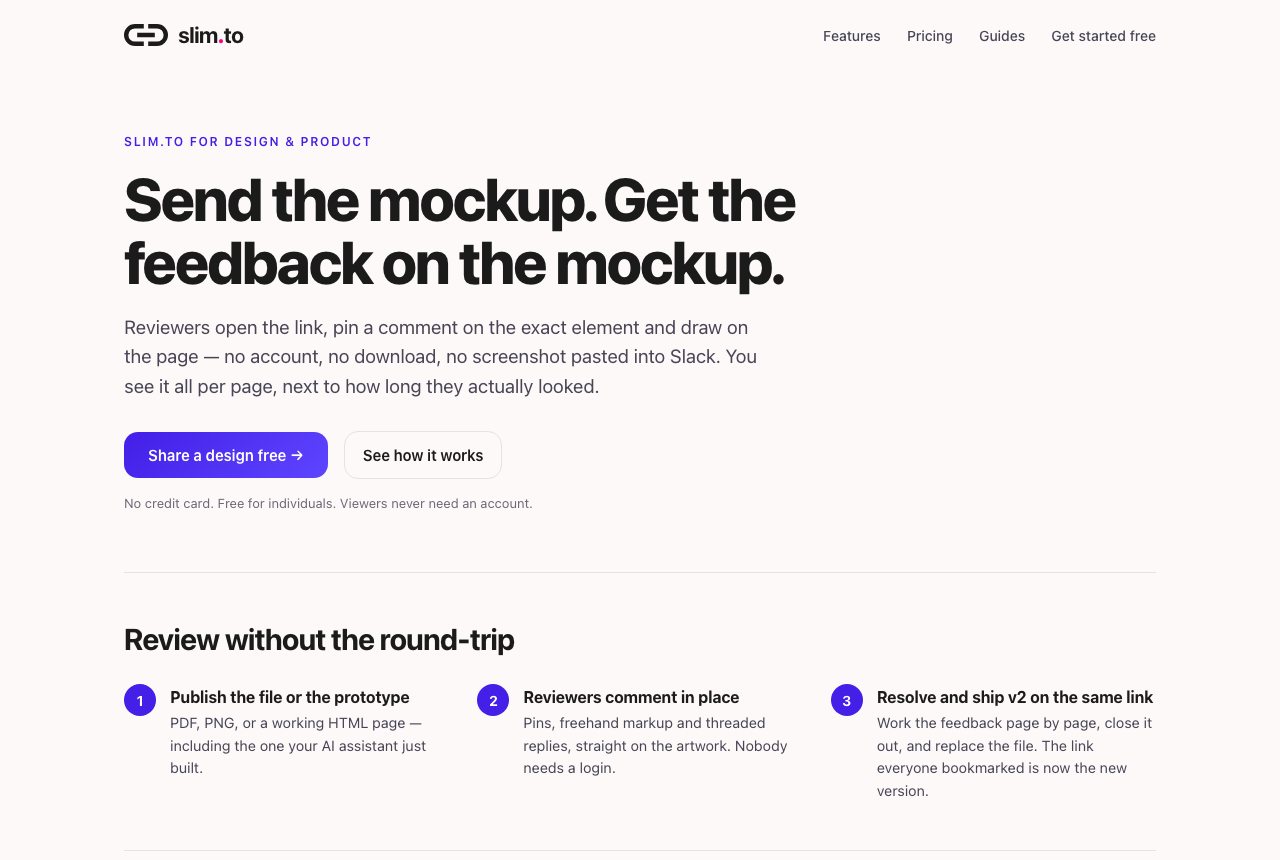
Each page is the same shape — a headline, a three-step flow, six feature cards, a pricing note — and the shape is the boring part. What matters is that the emphasis differs. The recruiting page leads with locking an offer to an email domain and an expiry on the decision date. The project-manager page leads with one address that always has this week's report. Those are true things about the same product that a single homepage cannot say at the same time.
Why the calls to action are links too
This is the part worth copying.
A hosted page on slim.to already reports who opened it, how long they stayed and how far they scrolled. That tells you which page got read. It does not tell you which page got someone to act.
So each page's button goes through its own short link before it reaches the sign-up form. Now there are two numbers per audience, and the ratio between them is the one you actually want:
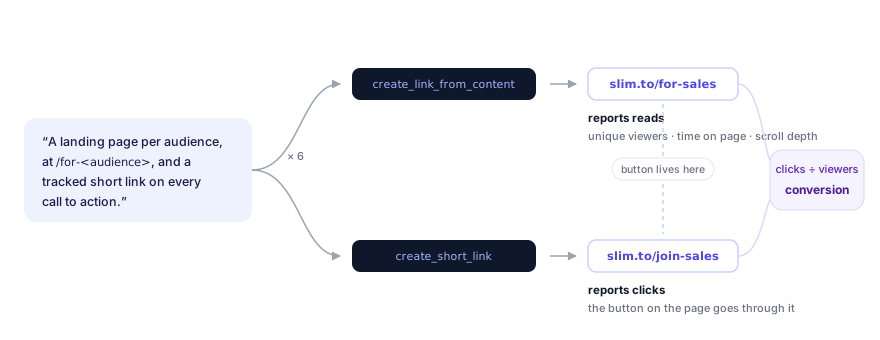
None of this needed a second tool. create_short_link is in the same connector
as create_link_from_content; the assistant used both in the same turn.
Asking which one is winning
The pages went live the day this was written, so the honest answer today is "give it a fortnight". But the question, when it's time, is one sentence:
Which of the audience pages is doing best?
Behind that, the assistant calls get_link_analytics once for each page and
once for each button, and comes back with something like a table: unique
viewers, average time on page, and clicks on the call to action, per audience.
The fields are the ones every slim.to link carries — total views, unique
viewers, time spent, device, country and referrer breakdowns, and the last few
sessions — so there is nothing to configure.
Then the follow-up, which is where this stops being a report and starts being a loop:
The PR page has the reads but not the clicks. Rewrite its headline and the first section around embargoes, and publish it to the same link.
replace_link_content swaps the HTML behind slim.to/for-pr. The address the
homepage card points to doesn't change. The read history doesn't reset. You
just get to see whether the new version does better than the old one did.
Keeping six pages findable
Two small habits make a batch like this manageable a month later.
Name the slugs as a family. for-sales, for-fundraising, join-sales,
join-fundraising. Anyone — including the assistant — can list them with a
search for for- and get the whole set.
Tag them. The connector's create tools take a tags list, so
"tag all of these audience-pages" is a valid part of the original prompt, and
list_links can filter by that tag afterwards. Slug conventions drift; a tag
is a tag.
Where the source lives
The assistant wrote the pages; we kept them. The six HTML files sit in the
slim.to repository alongside a small script that renders them from one
template, which is what makes a copy change a one-line edit followed by a
replace_link_content call — same URL, new page. If you do this for your own
site, keep the files somewhere versioned for the same reason.
Doing this yourself
- Connect slim.to to your assistant. In Claude: open the
slim.to listing in the
Connectors Directory, click Connect, then Authorize. Elsewhere, add
the URL
https://slim.to/mcpas a connector. The desktop and CLI routes are in the full setup guide. - If you want the pages on your own domain, add it in Dashboard → Domains first, then say so in the prompt: "publish them on pages.example.com."
- Ask for the pages. Name the audiences, name the slugs, ask for a tracked short link per call to action, and ask for a tag.
One thing to know before you start: the free plan caps active links at five, and a page-plus-button per audience is two links each. Six audiences is twelve. This is a Pro-plan pattern, and the trial covers the first fortnight of it.
Where to go next
- “Make me a newspaper” — publishing a page from a chat — the single-page version of this, including the replace-in-place surprise
- Turn what your AI assistant just wrote into a tracked link — the illustrated connector setup
- Put your own domain on every link you share
Keep reading
-
Turn what your AI assistant just wrote into a tracked link on your own domain
Connect slim.to to Claude, ChatGPT or Gemini over MCP, publish the document your...
-
“Make me a newspaper” — publishing a web page straight from a chat
What it actually looks like to ask an assistant for a web page, get a live URL on your...
-
Tracked links for AI agents
An agent that produces a report has nowhere to put it. Give it an API key or an MCP...